
The SEO Checklist for technical fixes, content, and backlinks
Every single day, Google processes an estimated 8.5 billion search queries, yet a staggering 90.63% of all web pages receive zero organic traffic from those searches. The difference between invisible pages and those capturing millions of clicks rarely comes down to budget, but rather to how consistently someone implements SEO actions. Many website owners feel overwhelmed by the sheer volume of work: technical audits, backlink tracking, and content refreshes. That is understandable. Additionally, they mistakenly assume that the only way to break through is by hiring an expensive agency.
That is why our product was created, an SEO checklist in Google Sheets. Instead of another dose of theory, the template breaks down complex strategies into a simple, daily to-do list to best position yourself in well-known search engines like Google or Bing. It does not matter whether you are just launching a project, looking for local clients for a small business, or scaling a large eCommerce store.
Below, we explain what this SEO checklist is exactly, what its purpose is, and what you will find in this product.
What exactly Is SEO (Search Engine Optimization)?
It is the process of improving a website to increase its visibility and rankings in organic search results. By optimizing for search algorithms and user intent, a site can attract continuous stream of free, targeted traffic without paying for ads.


Is SEO difficult?
It depends. It is hard to give a single, simple answer because everything comes down to how optimization is handled from the very beginning. If you are just starting out and making changes to your site blindly, without prior knowledge, it is easy to make mistakes. Fixing them and getting back to a point where your site actually ranks well can be much harder than doing it right the first time, as it requires digging deeper into the topic to understand exactly what went wrong.
In other words, the level of difficulty depends on where you are starting from and how much you already know about SEO. For someone who understands the basics and works methodically, the process is completely manageable. For someone who jumps into it with no plan at all, it can turn out to be surprisingly time-consuming and frustrating.
That is why, to guide you through the entire optimization process as smoothly as possible, we created a comprehensive product - our SEO Template - which helps you organize and implement SEO actions step by step.
How to get started with the Template
Access to the tool begins with the PDF file you receive after your purchase. Inside, you will find a direct link to the SEO Checklist template; clicking it automatically creates your private copy on Google Drive.
This copy is a fully editable, customizable file. You can immediately start adding your tasks, assigning them to specific team members, and setting deadlines so everything aligns with your business goals. The template is divided into several clear tabs, making your workflow intuitive.
Everything starts with the Setup tab, which forms the foundation of the entire process:
-
Define categories: Organize tasks into key pillars such as on-page SEO, content strategy, technical setup, or backlink management.
-
Assign team responsibilities: Assign specific roles and accountability to team members for individual tasks.
-
Set priorities: Establish a clear workflow hierarchy by labeling tasks as low, medium, or high priority.
Once you finish the configuration in the Setup tab, the entire template synchronizes automatically, all data and progress tracking remain consistent across every part of the dashboard from that moment on.
Is the checklist easy to use and up to date?
We designed the template so you can start using it right away, which is actually one of the things our customers praise most in their reviews. On top of that, we regularly update the tasks every few months to ensure they align with the latest Google algorithm changes and current ranking requirements.
Can this template be used in Microsoft Excel?
The template is designed specifically for Google Sheets to ensure all formulas, formatting, and interactive checkmarks function correctly. It is not optimized for Excel, so we recommend using it directly in Google Sheets for the best experience.
What areas of SEO does it cover?
The template covers a range of optimization areas, with tasks organized across 6 core categories:
-
Overview of the page
-
On-page SEO
-
Content updates
-
Architecture
-
Technical SEO
-
Backlink assessment
The SEO Checklist: The main dashboard
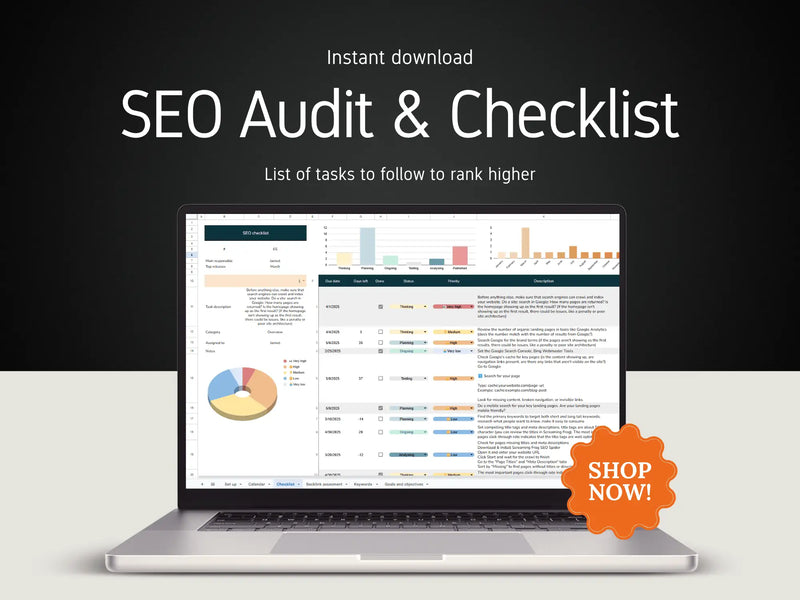
At the heart of the template is the SEO Checklist tab, featuring around 65 specific tasks that guide you step-by-step through optimizing your website. Instead of getting lost trying to figure out what to do first, you have a ready-made structure that makes prioritizing easy: from meta tags and internal linking to mobile site performance.
If you are aiming for more than just basic search engine optimization, the good news is that the checklist tasks do not focus solely on SEO. They also touch upon related areas like marketing and UX to ensure no critical element of your website is overlooked and everything works cohesively. After all, strong visibility on Google isn't just about the right keywords; it's also about how your site looks and how easy it is to navigate.
Every task in the checklist includes several elements to streamline your work:
-
Deadlines: A due date and an automatic countdown of the days remaining until the deadline.
-
Priority: Each task is assigned a weight, helping you know what to tackle first.
-
Category and description: Clear details on what the task involves and which SEO area it belongs to.
-
Educational resources: Direct links to resources that help you understand the specific task, allowing you to learn on the go as you implement changes.
-
Team assignment: A field where you can designate who is responsible for a given task, keeping everything transparent and ensuring accountability.
EXAMPLE OF THE CHECKLIST TAB

Additional information about the template
This template works for any experience level. Many tasks include educational links and source materials, meaning you do not have to search for information separately as you implement changes.
The product also pairs exceptionally well with paid tools like Ahrefs or Semrush, especially for keyword research tasks, where these platforms provide truly solid data. However, there is nothing stopping you from using free solutions and AI assistance, such as ChatGPT or Gemini, which are equally capable of accelerating your research or answering ongoing SEO questions while you work through the sheet.
Premium Digital SEO Template
Master your data with professional charts and dashboards meticulously designed to save you hours of manual work.
Premium Digital SEO Template
Master your data with professional charts and dashboards meticulously designed to save you hours of manual work.
Explore the SEO Template →Practical optimization examples
The checklist consists of specific, actionable steps that guide you through the entire search engine optimization process. This ensures that nothing slips through the cracks, neither important technical details nor more creative, content-related tasks.
Here are a few examples of tasks you will find inside:
-
Check indexing and visibility: Verify whether your key subpages are correctly indexed by Google and whether their content and navigation are fully visible in search results.
-
Optimize on-page elements: Make sure your main keywords appear naturally in H1 headers, URLs, and image alt text.
-
Organize your site structure: Review your internal linking and ensure that category pages correctly lead to subcategories and products, which improves both user experience and search engine authority.
Second tab: Backlink assessment and authority building
The second tab of the template, Backlink Assessment, focuses on site authority. Here you will find 33 specific tasks designed to help you find, evaluate, and continuously manage your backlinks, the ones that genuinely impact how high your site ranks and how much the search engine trusts it.
If backlinks are a new concept for you: in short, they act like "votes of confidence" from other websites across the internet. The more valuable websites link to you, the stronger the signal to Google that your site is trustworthy and deserves a higher ranking. Managing these links is not a one-time chore, but something that pays off in the long run. The template provides a ready-made, systematic way to track these connections, keeping your entire external linking strategy organized and healthy.
"Over 200 factors are used in ranking, but links are among the top few." - John Mueller, Google Search Advocate, 2021
Third tab: Keyword research & tracking
The keyword research and mapping tab was designed specifically for people who do not use expensive paid programs like Ahrefs or Semrush to track their progress.
Thanks to this tool, you do not need to invest in costly subscriptions. Free sources such as Google Search Console or the Google Ads Keyword Planner are enough to find valuable phrases and easily organize them right within the spreadsheet.
EXAMPLE OF THE KEYWORDS MAPPING TAB

This tab helps you comprehensively manage the entire process. It allows you to monitor traffic and rankings over a 3, 6, or 12-month period, precisely assign keywords to specific locations on your site (such as titles, tags, or alt text), and plan future actions and potential backlink opportunities. Furthermore, all entered data automatically feeds integrated charts, giving you a complete, visual overview of your SEO strategy's development over time.
SEO goals tracker
To simplify the objective-setting process, the template includes a dedicated Goals tracker tab. This feature allows for the establishment of high-level SEO goals, which can then be assigned priority levels and deconstructed into smaller, manageable steps.
The tracker facilitates an efficient workflow by turning broad objectives into achievable milestones:
-
Actionable planning: Users can break down large tasks, such as updating 20 blog articles, into daily increments and track progress as each is completed;
-
Team delegation: Specific goals can be assigned to different team members to ensure accountability;
-
Timeline oversight: Completion dates can be logged to monitor the pace of the overall SEO strategy.
Premium Digital SEO Template
Master your data with professional charts and dashboards meticulously designed to save you hours of manual work.
Premium Digital SEO Template
Master your data with professional charts and dashboards meticulously designed to save you hours of manual work.
Explore the SEO Template →SEO calendar
The Calendar tab provides an overview for organizing search engine optimization activities throughout the year. It serves as a central log for marking site updates, tracking published content, and monitoring exactly when specific changes were implemented. This view is particularly beneficial for team collaboration, as it ensures all members have visibility into completed tasks and upcoming priorities.
EXAMPLE OF THE CALENDAR TAB

All updates within the calendar are color-coded by priority (high, medium, low), providing a visual system to quickly identify which tasks require the most urgent attention.
Get the SEO Checklist right now
The SEO Checklist Template is available through the store or via the link provided in the video description. It offers a beginner-friendly, structured approach to managing website performance and improving Google rankings one step at a time.
Is it possible to share the dashboard with a team?
Yes, the template leverages the native sharing capabilities of Google Sheets, allowing for real-time collaboration. Team members can view updates instantly, making the tracking of SEO progress transparent and simple.
Are any third-party add-ons or scripts required?
No additional software, extensions, or scripts are needed. The entire template operates natively within Google Sheets, ensuring it is ready for immediate use upon access.


